⟳DROID TYCOON — Keep or Let GoWEB
Tap a droid's rarity dots to log what you own. Amber ring = the next upgrade worth chasing — anything at or below your best is safe to let go of. Press and hold a dot (or right-click on desktop) to set an exact colorway.
Progress saves in this browser only — it won't sync with the desktop app or your other devices. Use Export below before clearing site data or switching browsers/phones, then Import it back.
0 / 0
DROIDS MAXED
📖 How to use this
-
If you're charting your rebirth cycles — which droid unlocks at which level — switch to the By Rebirth Level view in the toolbar below.

-
You'll get a layout like this — one row per rebirth level, three droids per row:
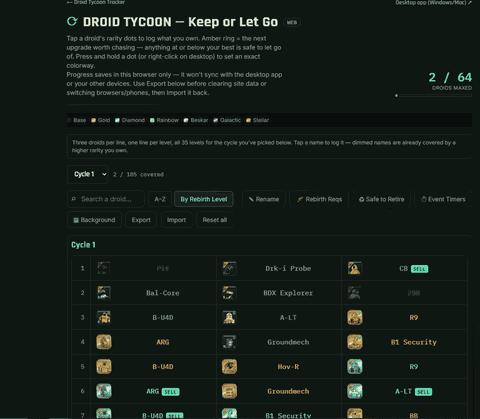
Tap or click a droid to log it at that exact rarity — tap it again to clear it. If a tap doesn't seem to do anything, you've already logged a higher rarity for that droid somewhere else. Either way, press and hold (or right-click on desktop) any of its cells to open a menu listing every rarity — tap the checked one to clear it, or tap a different one to set that as what you own.
Good to know
- The A–Z view works the same way — tap a droid's rarity dot to log it, tap your current best again to undo it, or press and hold (right-click) a dot for that same set-exact-rarity menu.
- SELL flags, in the colors of the old Cycle 5 chart: a yellow SELL means that's the last time this droid is needed this cycle, safe to fuse or sell once you own it. A red 23 or green 34 number means you can sell it now, but that rebirth needs it again at a higher rarity (red: 21–30, green: 31+). No flag: you'll need it again soon.
- 👥 Friends: copy your code (or a link) and send it to a friend; paste theirs to see their next rebirths and everything their cycle needs. A code is a snapshot, so ask for a new one when they've moved on.
- A dimmed name in the By Rebirth Level view is already covered by a higher rarity you logged elsewhere — nothing to do there.
- 🧬 Rebirth Reqs lists everything the selected cycle asks for, low to high, in one panel.
- ♻ Safe to Retire lists droids you own that the cycle is done asking for, grouped by tier (tap a tier to hide/show it) — enter your current rebirth level in that panel first.
- On a phone, tap the already-lit A–Z or By Rebirth Level button again to hide the droid list, so 🧬 Rebirth Reqs / ♻ Safe to Retire sit right under the toolbar instead of at the bottom of a long scroll. Tap either one to bring the list back.
- ⏱ Event Timers shows live countdowns to the next Stellar/Mythic/Kyber drop and the next mission.
- 🔮 Sneak Preview shows the Mythic droids the next cycle will ask for. When you finish a cycle you'll be asked to pick Next Cycle (reset it and move on) or Sneak Preview (reset it and open the preview) — close the box with ✕ to leave everything as it is.
- Export a backup before clearing site data, switching browsers, or moving to a new device, then Import it back. Reset all clears every droid you've logged and can't be undone.
🎨 LookRecolors this page. Your droid colors stay the same.
Rarity on each droid
Event Timers
Wall-clock countdowns only — nothing here reads the game. The mission name/order is a best guess; sync it below if it drifts from what you see in-game.
Stellar
--:--
Mythic
--:--
Kyber
--:--

—
--:--
:
Nothing selected — tap A–Z, By Rebirth Level, 🧬 Rebirth Reqs, ♻ Safe to Retire or 🔮 Sneak Preview to show a view.
Rebirth Requirements
Every droid this cycle calls for, grouped low to high (Base → Stellar) — the highest variety needed per droid. Tap one to log it (marks every lower variety of that droid in the list on the left too).
Safe to Retire
Droids you've already logged, past the last level this cycle still asks for them — nothing left to lose by fusing or selling your copy. Tap a tier to show or hide it. Tap a droid once you've sold or fused it to mark it retired; tap it again to undo.
🔮 Sneak Preview
Next: Cycle 2 — the Mythic droids it will ask for, each at the highest variety it ever needs, highest first. Start hunting these before you get there. Tap one you already have to mark it: it's logged for you when you switch to that cycle.
👥 Friends
🌐 Live
A snapshot of right now: send a new one when you've moved on. The link opens it in any browser.
Upgrade chip costs
| Rarity | Common | Rare | Epic | Legendary | Mythic |
|---|---|---|---|---|---|
| Gold | 10 | 30 | 120 | 400 | 4,000 |
| Diamond | 25 | 60 | 180 | 1,200 | 8,000 |
| Rainbow | 40 | 100 | 240 | 2,500 | 14,000 |
| Beskar | 80 | 250 | 2,000 | 6,000 | 30,000 |
| Galactic | 120 | 400 | 5,000 | 16,000 | 60,000 |
| Stellar | 180 | 750 | 8,000 | 24,000 | 90,000 |